“The sirens are going. Where’s the nearest shelter?”
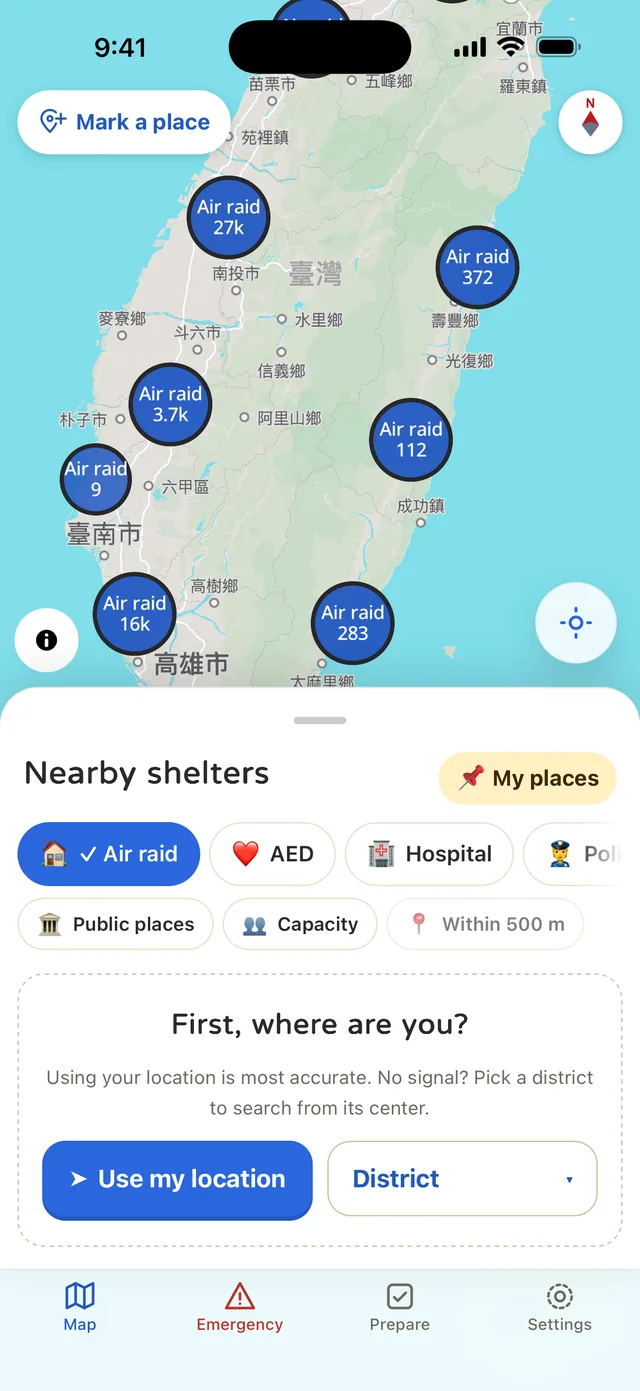
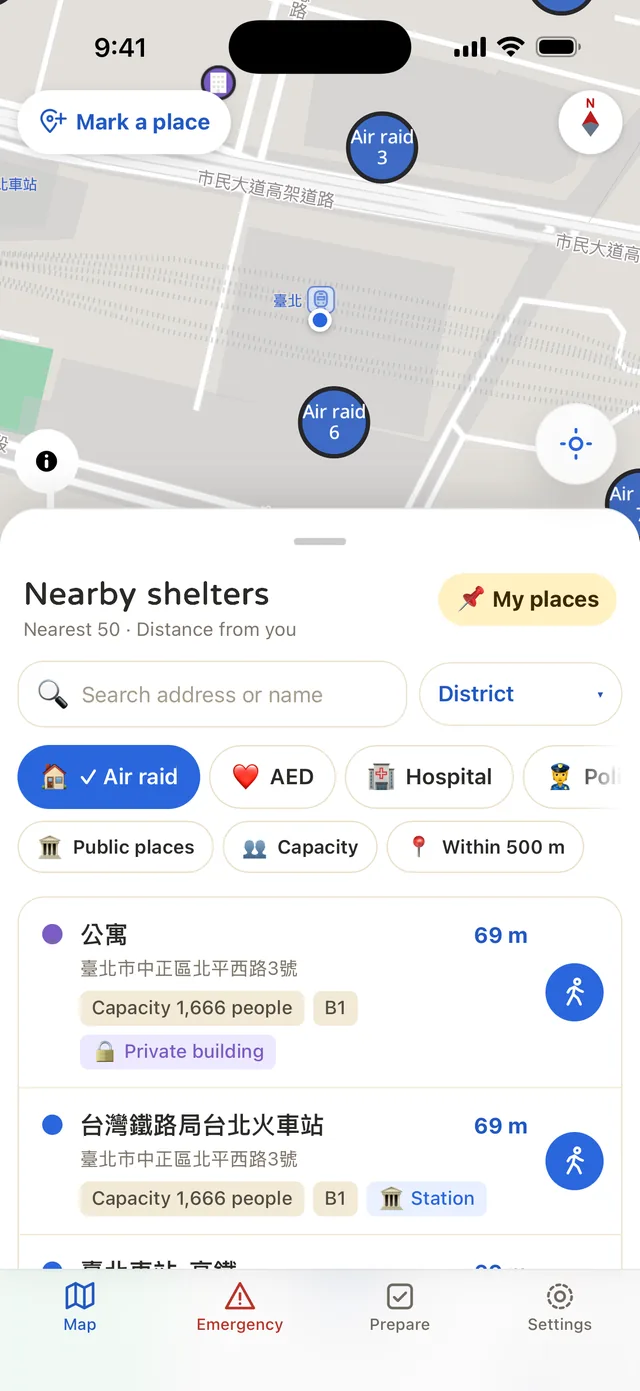
Open the app and you’re on the map. Nearby shelters are sorted by distance. Tap one and it plans a walking route.
An offline emergency-prep app for Taiwan · iOS and Android
Kuku 防災助手 is an offline emergency-prep app for Taiwan. Open it and the nearest shelter is right there, even in airplane mode. No login.
Kuku 防災助手 puts all 98,028 air-raid shelters across Taiwan’s 22 cities and counties on your phone. You also get an AED and hospital map, a medical card, large-text help cards, and a preparedness checklist, all of it offline.
Free to download. The shelter map, emergency tools, and 1-day checklist are all free.
Screens are real screenshots from the app. Shelter data is compiled from government open data, September 2026 edition.
MOMENTS
Handy on a normal day. When it matters, it’s already in your pocket.
“The sirens are going. Where’s the nearest shelter?”
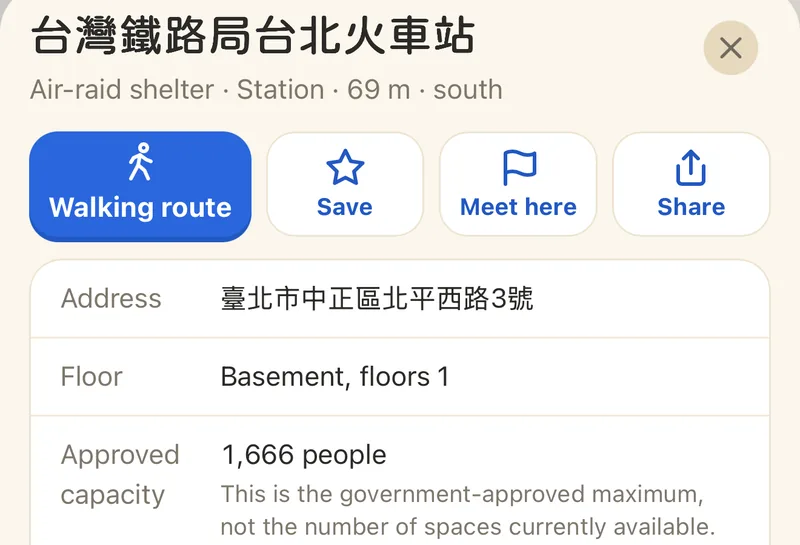
Open the app and you’re on the map. Nearby shelters are sorted by distance. Tap one and it plans a walking route.
“Power’s out, no signal, and the map won’t load.”
The shelter data and a Taiwan overview map are built into the app. Search in airplane mode, or drag the map around without turning on location.
“How much water are we supposed to keep at home, anyway?”
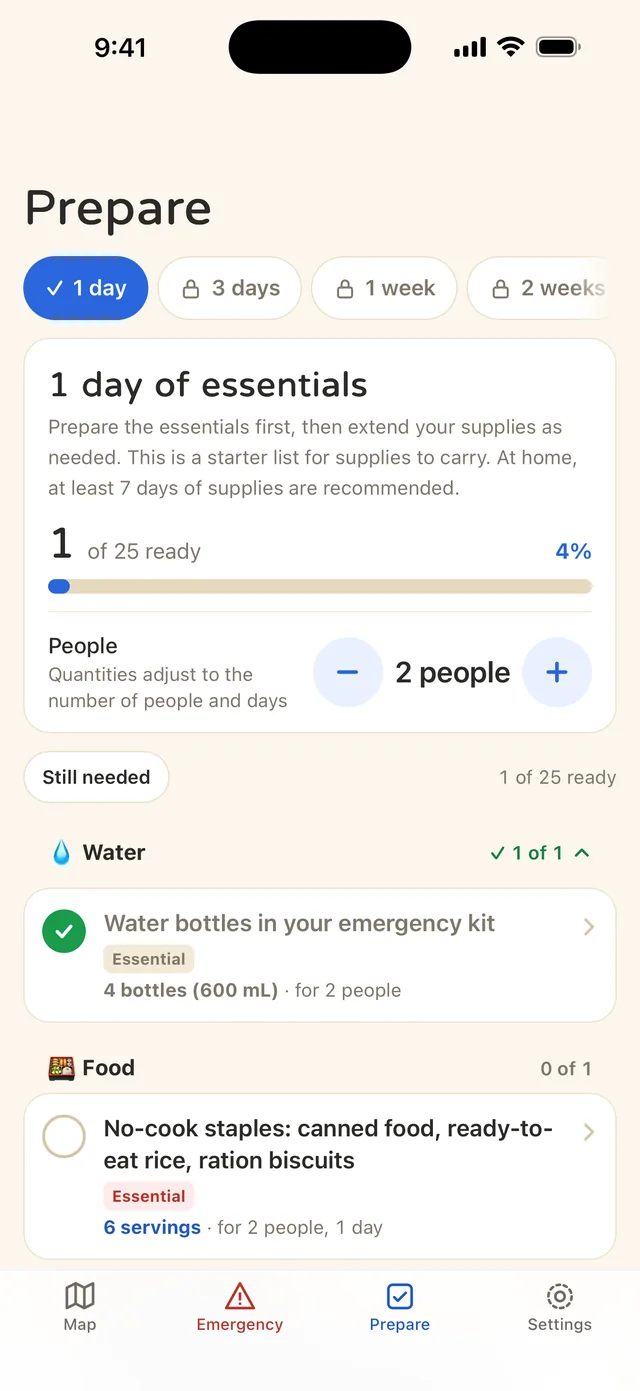
The 1-day essentials checklist scales to your household. Water, food, medicine, light, communication, documents. Check them off and breathe easy.
“I’m hurt, but I can’t get the words out.”
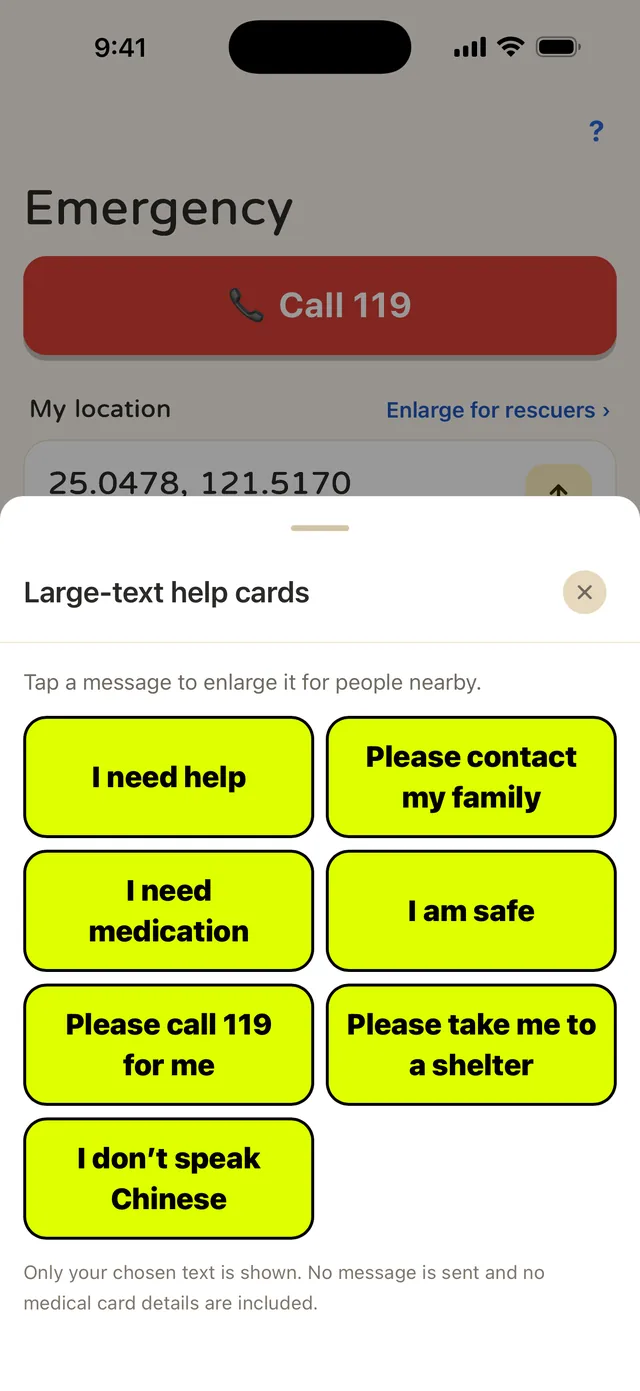
Large-text help cards put one big message on screen for the people around you. Your medical card lets responders see your medications, allergies, and contacts.
FEATURES
Six things. Not one of them needs a connection.
The address, floor, and capacity of every air-raid shelter in Taiwan are on your phone, like “B1, holds 66 people”. Filter fast with “Public places”, “Capacity”, and “Within 500 m”.
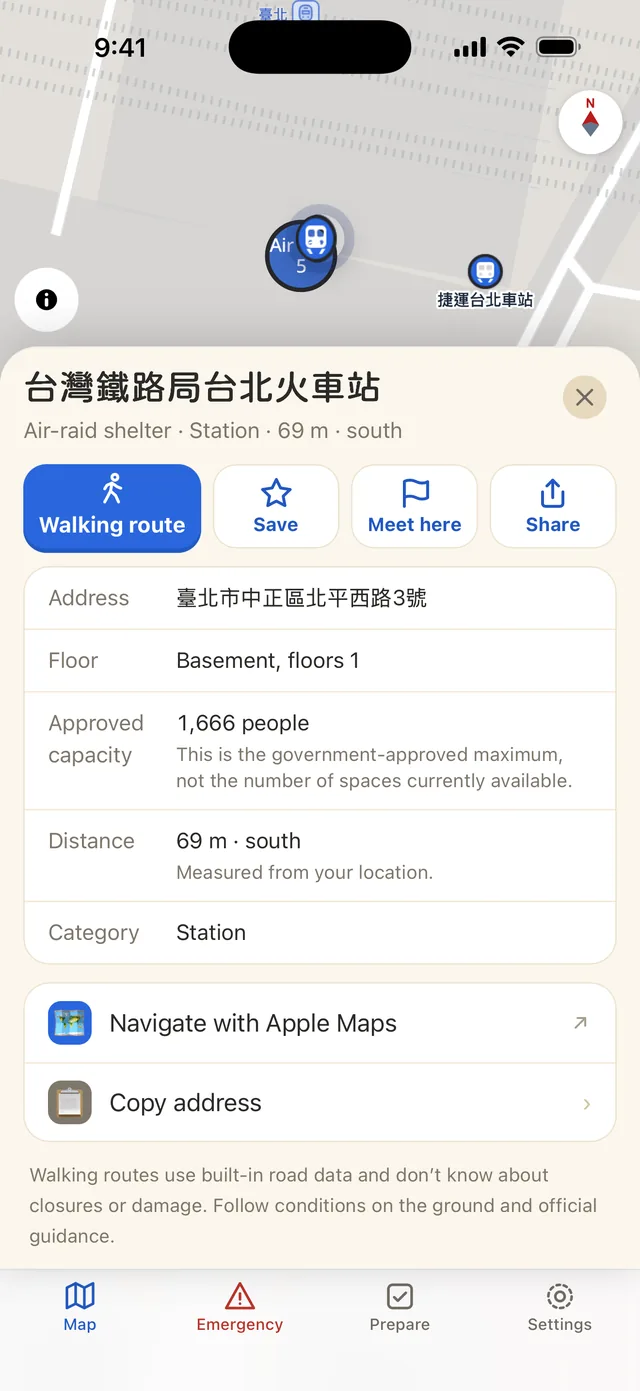
Pick a shelter and plan an offline walking route in one tap, or hand it off to the map app you already use.
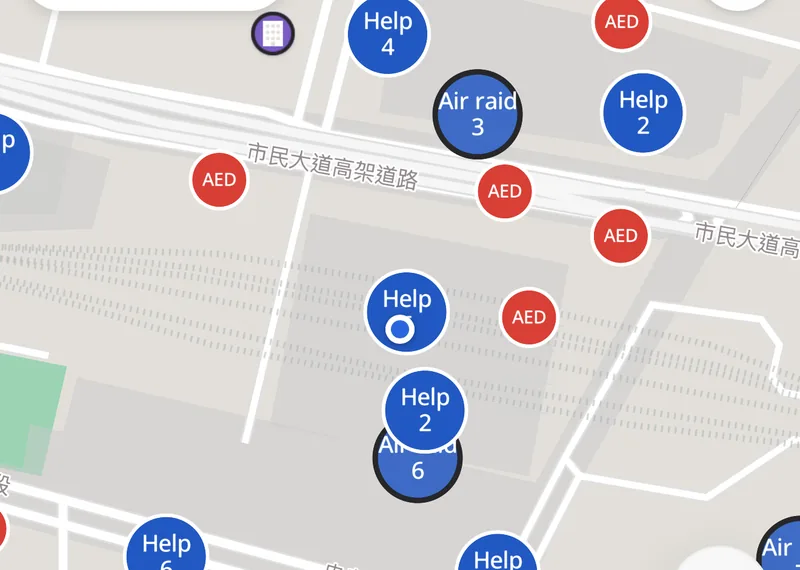
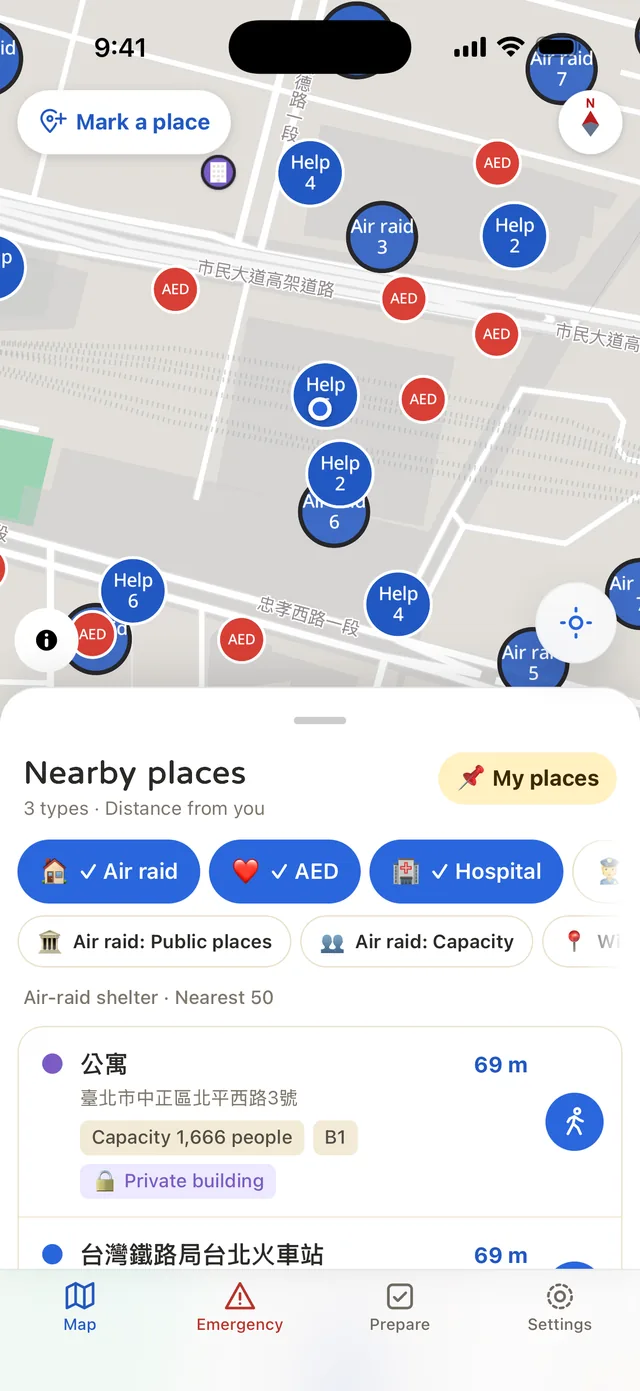
Emergency facilities and air-raid shelters share one map. Pick the types you want to see. Filter by name, address, or within 500 m.
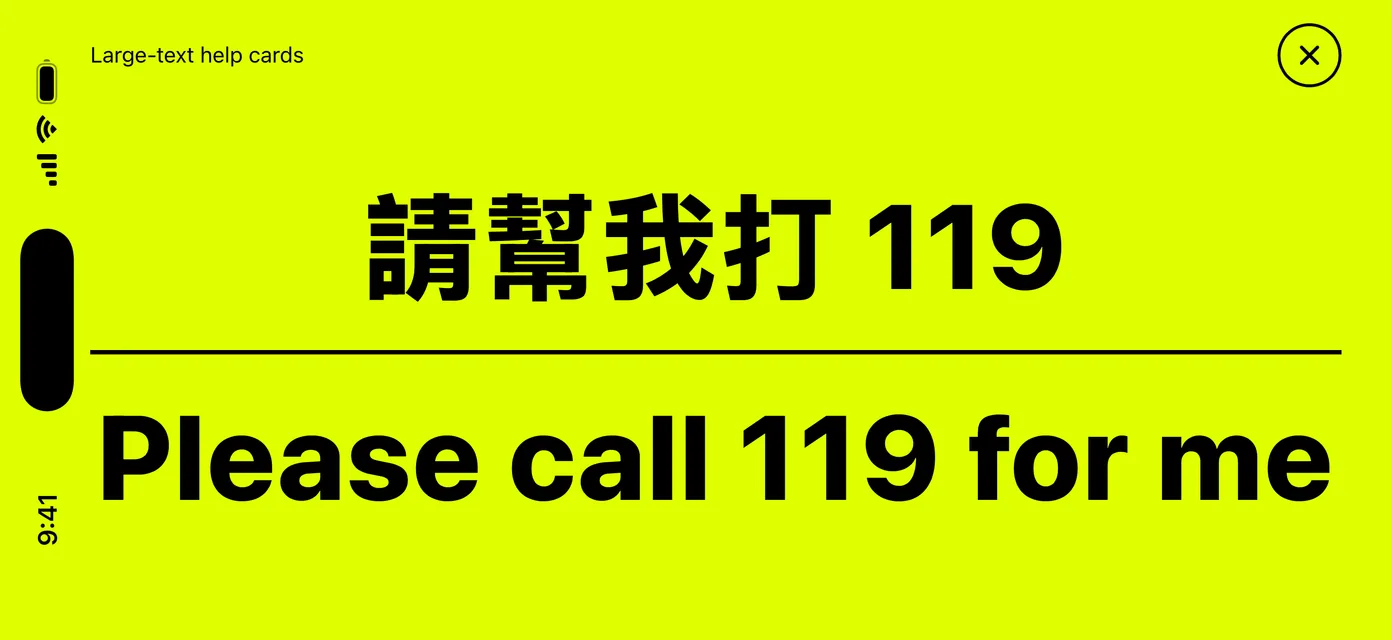
When you can’t speak, one tap turns the whole screen into one sentence. Seven cards: I need help, Please call 119 for me, Please take me to a shelter, I don’t speak Chinese, and more.
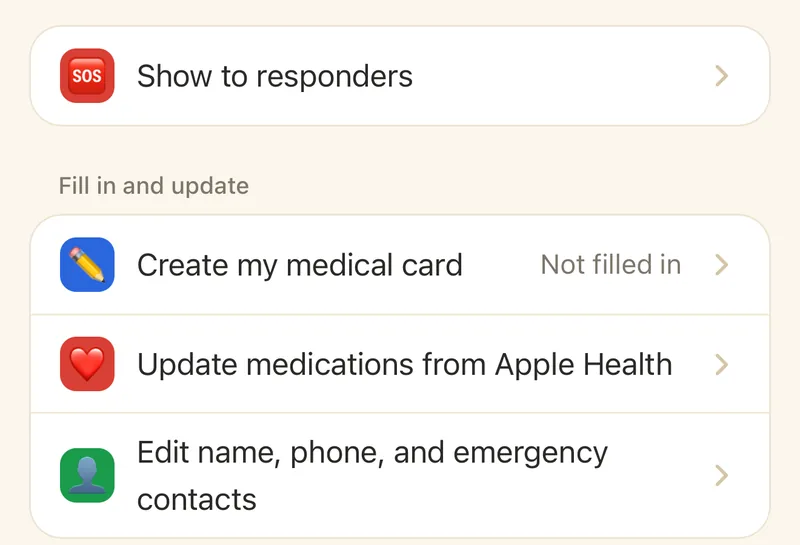
Fill in your medications, allergies, medical history, and emergency contacts ahead of time, and it opens with no signal. A “Show to responders” mode keeps the fixed labels in Traditional Chinese, paired with your chosen language.
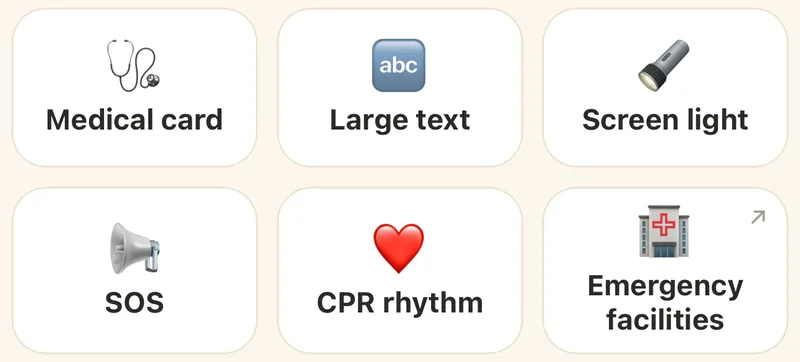
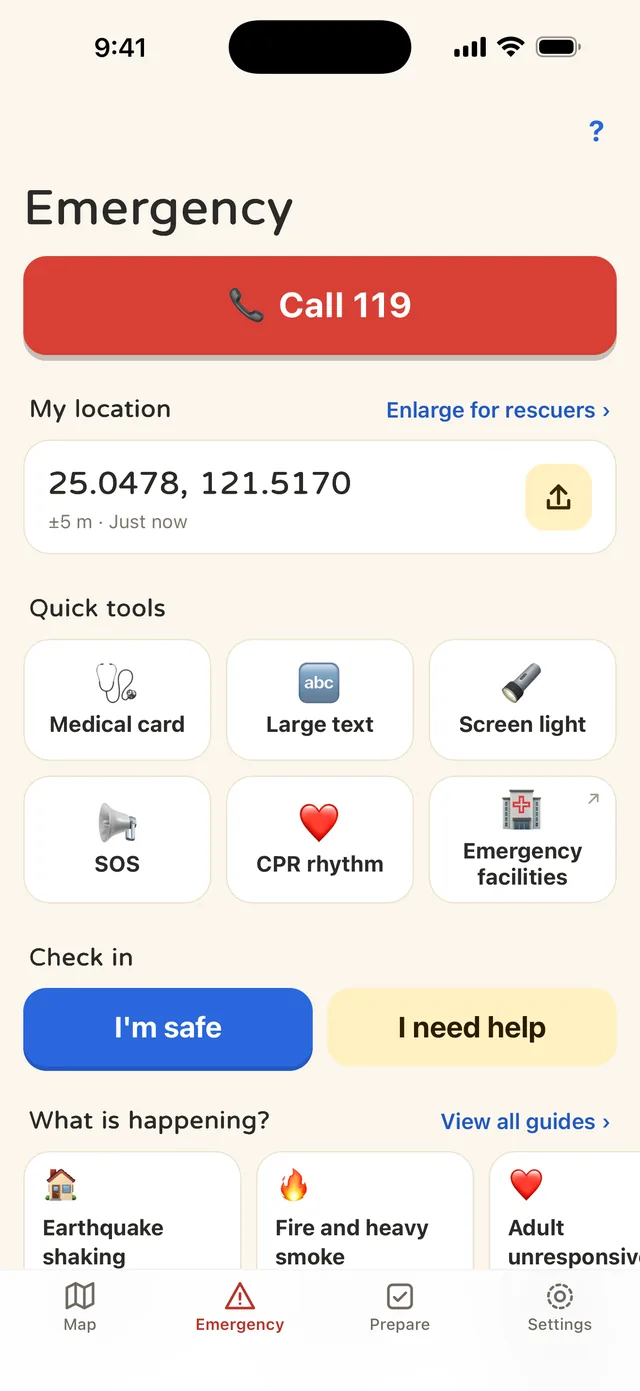
Medical card, large text, screen light, SOS, CPR rhythm, and emergency facilities: six tiles, one tap each. Above them, “My location” shows your coordinates in big type so you can read them out to rescuers.
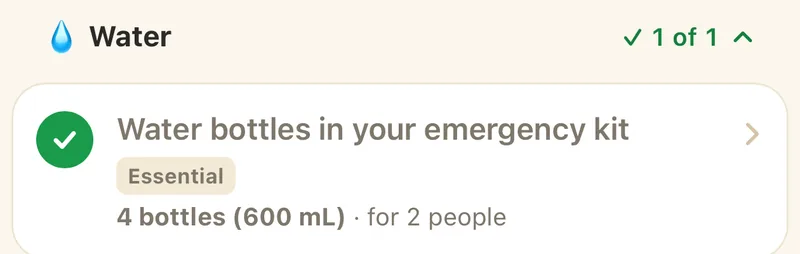
The “1 day of essentials” checklist covers water, food, medicine, light, communication, and documents, with quantities scaled to how many people you’re preparing for. Checkmarks are saved on your phone, and you can copy the whole list as text.
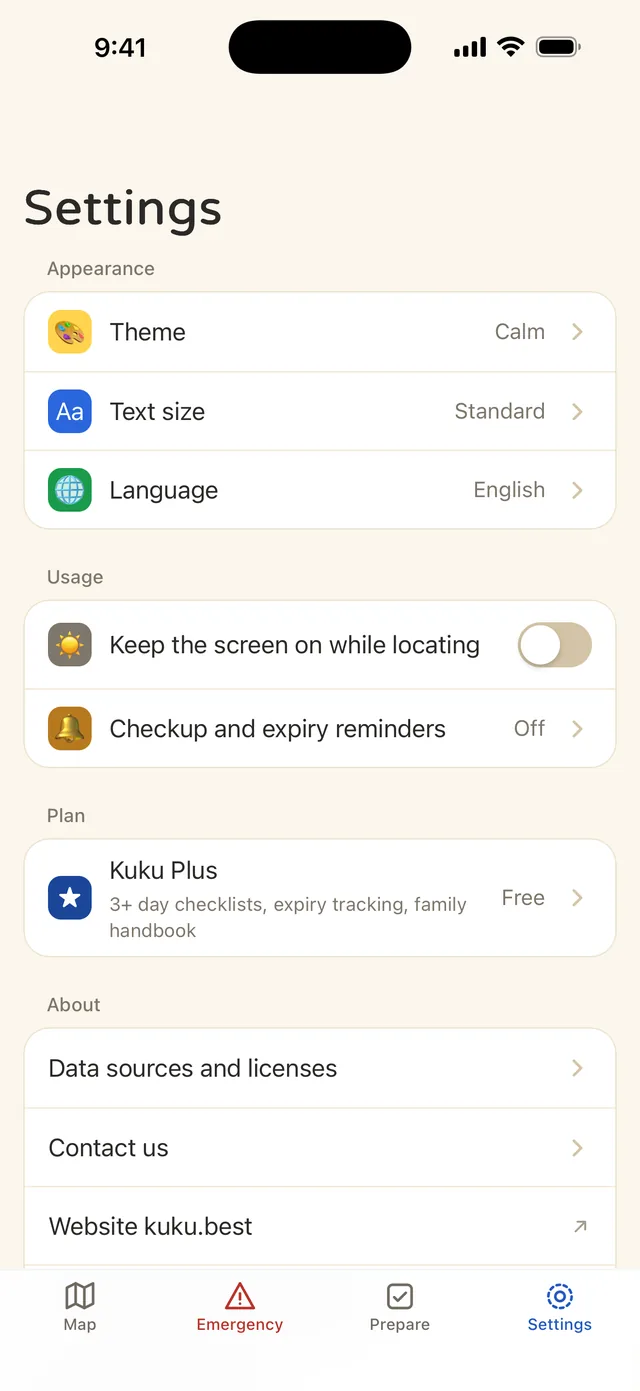
Turn on notifications and you’ll get a monthly reminder to recheck. Supplies with an expiry date get reminders 30 days before, 7 days before, and on the day.
HOW TO
No sign-up, no tutorial. Install it and you’re good to go.
Open the app and you’re on the map. Allow location and the nearest shelters jump to the top. Rather not turn on location? Pick a district or just drag the map around.
See the address, floor, and capacity. Save the shelters you’d actually use, or set one as your family’s meeting point. Share it and your family gets the name, address, coordinates, and a map link in one go.
Take a few minutes to fill in your medical card and check off the 1-day checklist. A monthly reminder nudges you to recheck, so the rest of the time you can forget about it.
SCREENS
Swipe to see more screens.
PLUS
Buy Plus once. Yours to keep. Not a subscription.
Pricing is shown in the store. Every preparedness feature works for a household of one, too. Sharing sends a copy. There’s no family sharing or syncing between devices.
PRIVACY
No sign-up, no login. Your saved places, contact card, medical card, and supply records live only on your phone.
Your position is calculated on the device and never uploaded. Nothing leaves your phone unless you choose to share something or open an external map, and then only what you picked.
Shelter data is compiled from datasets that city and county governments and police departments publish on Taiwan’s open data platform (data.gov.tw). Map data © OpenStreetMap contributors.
The data is compiled from the “air-raid evacuation shelter facilities” (防空疏散避難設施) datasets that the 22 city and county governments and police departments publish on Taiwan’s open data platform (data.gov.tw), used under the Open Government Data License v1.0. The app currently ships with the September 2026 edition, 98,028 shelters in all.
AEDs and the 210 hospitals come from the Ministry of Health and Welfare, police stations from the National Police Agency, and fire stations and disaster evacuation shelters from the National Fire Agency. Map data © OpenStreetMap contributors. The source agency and update date for every city and county dataset are listed in “Data sources and licenses”. To cross-check, the National Police Agency also runs an air-raid shelter portal.
Data sources and licenses National Police Agency air-raid shelter portal
Kuku 防災助手 is built and run by Simon Shih, an independent developer in Taiwan. It is not a government service. There’s no company server and no account, so your data stays on your phone. Spotted an error or have a question? Email us and we’ll review it with the next data update.
GUIDES
Six short guides that answer the questions we hear most.
Since 2025, Taiwan’s air raid drill has been part of the Urban Resilience Exercise. In 2026 it ran August 7–13 in five regions, 30 minutes each. The sirens, what to do, traffic rules, and fines.
Phones in Taiwan get emergency alerts without an app. The Ministry of National Defense recommends two government apps, and both can find shelters and report emergencies. Here’s how they compare with Kuku 防災助手.
Taiwan has 98,028 air-raid shelters in 22 cities and counties. How to find yours early, check it offline, act when sirens sound, and where the data is from.
One backpack per person with 1 to 3 days of supplies. Taiwan’s official go-bag checklist in English: what to pack, how much water, where to keep it, and when to check it.
Usually not. Many are private building basements, locked on a normal day, and building staff decide who gets in. Here’s why, and what to do ahead of time.
98,028 in all, September 2026 edition. Taipei City has the most, Lienchiang County the fewest. From 22 city and county open datasets, recounted at every update.
FAQ
Kuku 防災助手 is an independently developed offline emergency-prep app for Taiwan, available for iPhone, iPad, and Android. It stores the address, floor, and capacity of all 98,028 air-raid shelters across 22 cities and counties on your phone (government open data, September 2026 edition), plus the locations of AEDs, 210 hospitals, police stations, and fire stations. It also includes a medical card, large-text help cards, an SOS signal, a CPR rhythm, and a preparedness checklist. The shelter map and the 1-day checklist are free, and neither needs a connection or an account.
Yes. The data for all 98,028 shelters, a Taiwan overview map, and offline road data for all 22 cities and counties are built into the app, so you can find the nearest shelter and plan a walking route even in airplane mode. Plus lets you download county street maps to your phone, so lanes and buildings show even with no signal.
No. Kuku has no accounts and no cloud sync. Your medical card, saved places, and checklists live only on your phone. Your location is processed on the device and never uploaded.
The data is compiled from datasets that the 22 city and county governments and police departments publish on Taiwan’s open data platform (data.gov.tw), used under the Open Government Data License v1.0. The app currently ships with the September 2026 edition, 98,028 shelters in all. New data comes with app updates, and you can see the version under “About” in Settings. Each dataset is updated on its own schedule: the oldest dates from August 2022 and the newest from September 2026, listed county by county in “Data sources and licenses”. A shelter may have changed or may not be open, so check conditions on site before you set out.
No. Kuku 防災助手 is an offline lookup tool and can’t receive or push alerts. For alerts, rely on the government’s Public Warning System messages. The only notifications Kuku sends, and only if you turn them on, are reminders to recheck your checklist and supply expiry dates.
The free version includes the shelter and emergency facility map, offline walking routes across Taiwan, the medical card, large-text help cards, tools to use now, and the 1-day essentials checklist. Plus unlocks the 3, 7, 14, and 30-day checklists, supply tracking and expiry dates, multiple kits, the preparedness handbook, and downloadable county street maps. Plus is a one-time purchase, yours to keep, and not a subscription. Pricing is shown in the App Store and Google Play.
Traditional Chinese, English, Japanese, and Korean. Kuku can follow your device language, or you can switch it yourself. The medical card’s “Show to responders” mode always shows Traditional Chinese alongside your chosen language. Addresses and names from government data are shown as published and aren’t translated.
No. Kuku 防災助手 is independently developed and is not a government service. In an emergency, follow government alerts and instructions on site. For a fire, an injury, or a crime, call 119 or 110.
Usually not. Many shelters on the list are the basements of private buildings, which are normally locked or closed to the public, and the building’s management decides who gets in. Kuku gives you the location, floor, and capacity, but can’t guarantee access. On a normal day, use the “Public places” filter to pick out schools, train stations, parking garages, and government offices, then walk over and take a look at the entrance.
Read the full guide: Can you go into an air-raid shelter on a normal day?
First, check the Public Warning System message on your phone and follow the police, civil defense volunteers, and building staff on site. Government alerts and instructions come before any app. Then open Kuku and look at the nearest shelters, sorted by distance, even offline. If the closest one is locked, head for the basement or an interior room of the nearest sturdy building. Kuku can’t receive alerts and won’t call for help on your behalf. For a fire, an injury, or a crime, call 119 or 110 directly.
Read the full guide: Where can I find a bomb shelter near me in Taiwan?
Yes. The interface comes in Traditional Chinese, English, Japanese, and Korean, and it can follow your device language, or you can switch it yourself. Shelter names and addresses stay in the original Chinese from the government data, so you can match them to the signs and house numbers on the street. The large-text help cards include “I don’t speak Chinese”, “Please take me to a shelter”, and “Please call 119 for me”. One tap fills the screen with a single message you can show the people around you. The medical card’s “Show to responders” mode always uses Traditional Chinese, so responders can read it.
Kuku doesn’t send alerts, doesn’t report emergencies for you, and isn’t a government service. Its focus is working offline, four languages, the medical card, and the preparedness checklist, with all data built in and no account. To get alerts, make sure Public Warning System messages aren’t turned off on your phone. To report an emergency, call 119 or 110. You can keep Kuku alongside the government apps.
Read the full guide: Which emergency apps should you install in Taiwan?
Kuku 防災助手 is not a government service. In an emergency, follow government alerts and instructions on site.
Kuku 防災助手 is an independently developed offline lookup tool. It can’t receive or push alerts. The data is for reference only. A shelter may have changed or may not be open, so check conditions on site before you set out. For a fire, an injury, or a crime, call 119 or 110.
Free. No account, no internet needed.